← Back to Home
<required> = must be provided [optional] = can be omitted
Moderation Economy Leveling Games Configuration Proxy System Tickets Global Chat Utility Owner Only
No commands found matching your search.

Moderation

/ban Ban a user from the server (permanent or timed) mod.ban

Syntax

/ban <user> [duration] [reason]

Parameters

NameTypeRequiredDescription
userUserYesThe user to ban
durationStringNoDuration of the ban. Omit for permanent. Formats: 1d, 2h, 30m, 1w, 12h30m
reasonStringNoReason for the ban (logged in mod history). Defaults to "No reason provided"

Examples

/ban @John 7d Repeated rule violations — Bans John for 7 days
/ban @Spammer — Permanently bans a user with no reason
/ban @User 2h30m Cooling off — Bans for 2 hours and 30 minutes

Details

  • Deletes the user's messages from the last 7 days when banning.
  • If a duration is specified, the bot will automatically unban the user after the time expires.
  • A DM notification is sent to the user (if /punishment-dm is enabled), including the reason, duration, and an appeal button.
  • The action is logged to the mod history, accessible via /hist.
  • Role hierarchy is enforced — you can only ban users with roles below yours.

Screenshot
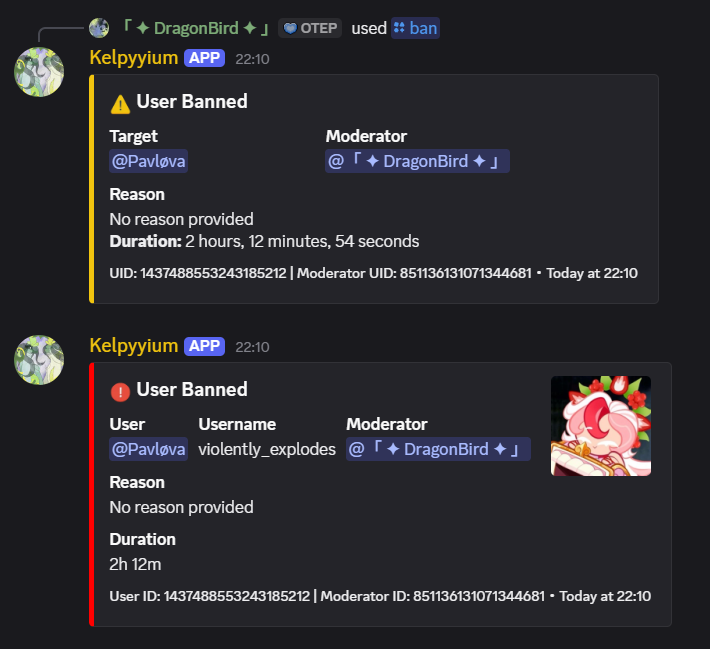
Ban command example

Example of the /ban command in action

/unban Unban a user from the server mod.unban

Syntax

/unban <user> [reason]

Parameters

NameTypeRequiredDescription
userUserYesThe user to unban
reasonStringNoReason for unbanning

Examples

/unban @John Appeal approved

Details

  • Removes the user from the server's ban list, allowing them to rejoin.
  • The action is logged in moderation history.

Screenshot
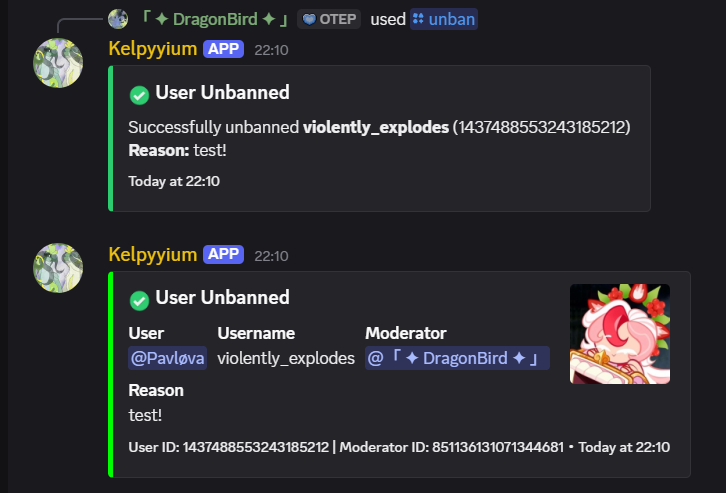
Unban command example

Example of the /unban command

/kick Kick a user from the server mod.kick

Syntax

/kick <user> [reason]

Parameters

NameTypeRequiredDescription
userUserYesThe user to kick
reasonStringNoReason for the kick. Defaults to "No reason provided"

Examples

/kick @John Breaking server rules

Details

  • The user is removed from the server but can rejoin with a new invite link.
  • A DM notification is sent to the user if punishment DMs are enabled.
  • Role hierarchy is enforced.
  • Logged in moderation history and AutoLog channel.

Screenshot
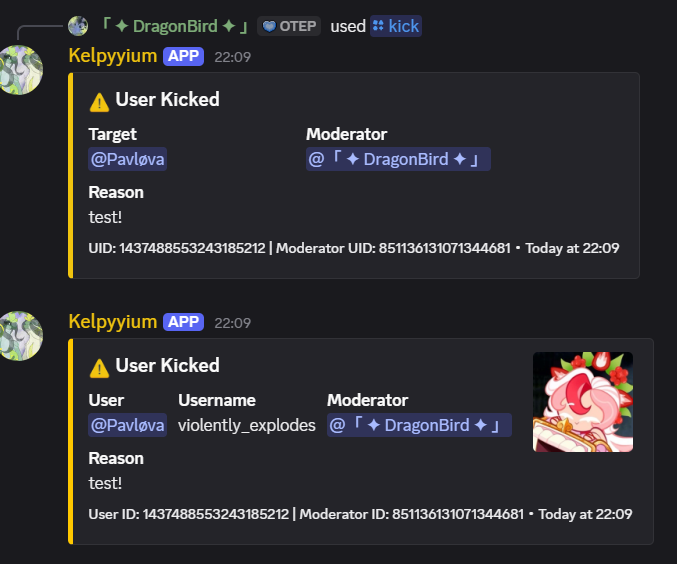
Kick command example

Example of the /kick command

/softban Softban a user (ban then immediately unban to delete their messages) mod.softban

Syntax

/softban <user> [reason]

Parameters

NameTypeRequiredDescription
userUserYesThe user to softban
reasonStringNoReason for the softban

Examples

/softban @Spammer Cleaning up spam messages

Details

  • Bans the user (deleting their last 7 days of messages) and immediately unbans them.
  • Effectively a "kick + message purge" — the user is removed and can rejoin, but their messages are cleaned up.
  • Useful for dealing with spam raids or nuking a user's message history.

Screenshot
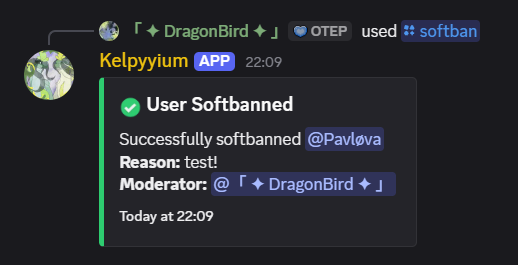
Softban command example

Example of the /softban command

/warn Warn a user (adds to their warning count) mod.warn

Syntax

/warn <user> [reason]

Parameters

NameTypeRequiredDescription
userUserYesThe user to warn
reasonStringNoReason for the warning. Defaults to "No reason provided"

Examples

/warn @John Please follow the rules
/warn @User Spamming in chat

Details

  • Adds a warning to the user's record. The total warning count is displayed in the response.
  • Warnings are stored per-server and can be viewed with /warns.
  • A DM notification is sent to the warned user if punishment DMs are enabled.
  • Cannot warn bots. Role hierarchy is enforced.

Screenshot
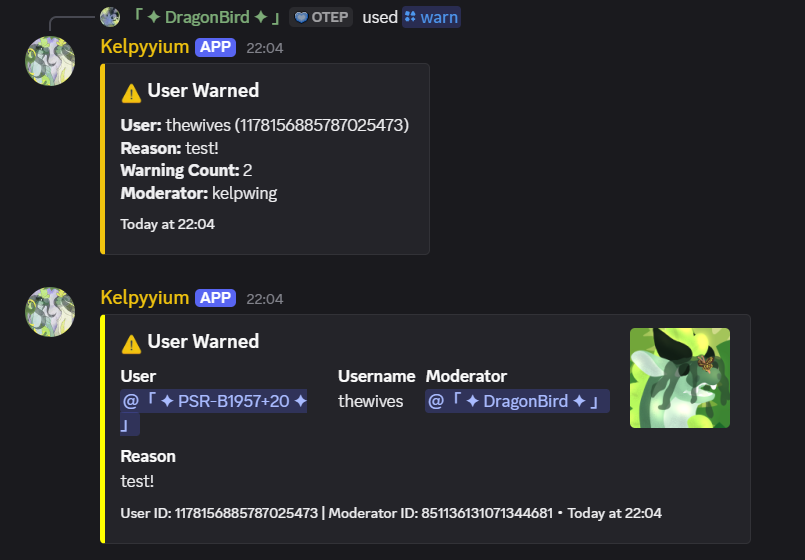
Warn command example

Example of the /warn command

/unwarn Remove the most recent warning from a user mod.unwarn

Syntax

/unwarn <user> [reason]

Parameters

NameTypeRequiredDescription
userUserYesThe user to remove a warning from
reasonStringNoReason for removing the warning

Examples

/unwarn @John Warning was unjustified

Details

  • Removes the most recent warning from the user's record.
  • Shows the removed warning's original reason and remaining warning count.
  • Logged to moderation history and AutoLog channel.

Screenshot
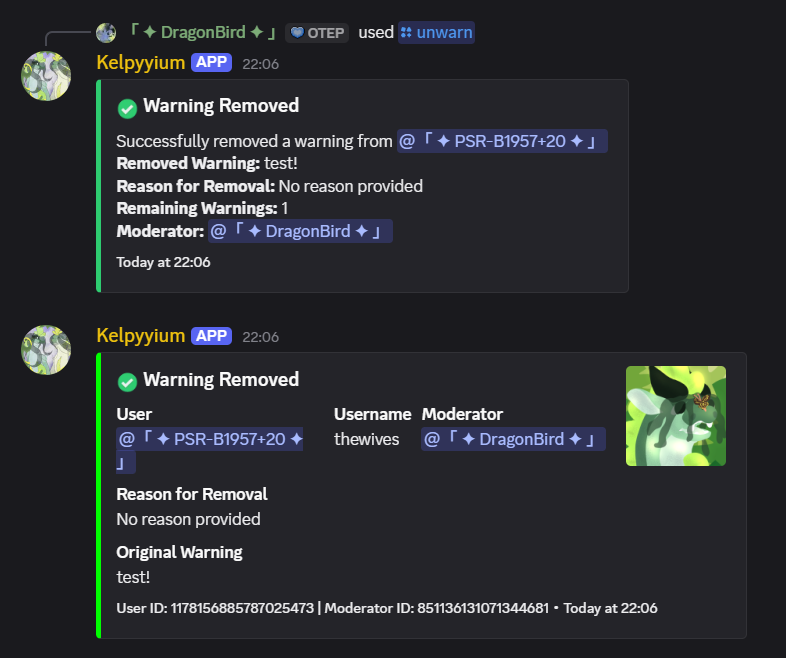
Unwarn command example

Example of the /unwarn command

/warns View a user's active warnings mod.warn

Syntax

/warns [user]

Parameters

NameTypeRequiredDescription
userUserNoUser to check warnings for. Defaults to yourself

Examples

/warns @John — View John's warnings
/warns — View your own warnings

Details

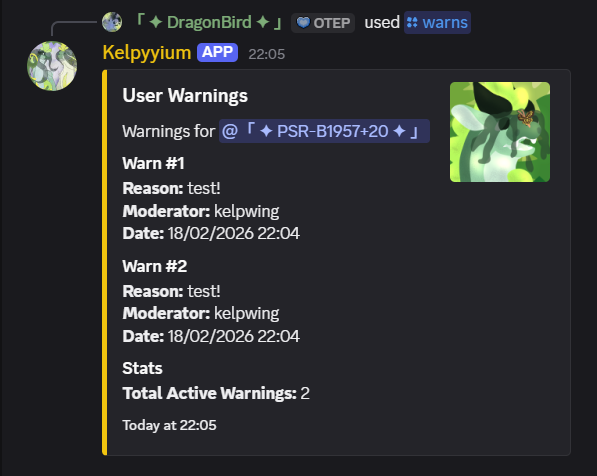
  • Displays each warning with the reason, moderator who issued it, and timestamp.
  • Shows total warning count.

Screenshot

Warns command example

Example of the /warns command output

/mute Mute a user (role-based mute with optional duration) mod.mute

Syntax

/mute <user> [duration] [reason]

Parameters

NameTypeRequiredDescription
userUserYesThe user to mute
durationStringNoDuration of mute (e.g., 1h, 30m, 2d). Omit for permanent
reasonStringNoReason for the mute

Examples

/mute @John 1h Inappropriate language
/mute @User 30m — 30 minute mute with no reason

Details

  • Applies a mute role that removes speaking permissions.
  • Timed mutes are automatically reversed when the duration expires.
  • DM notification sent if punishment DMs are configured.
/unmute Unmute a user mod.unmute

Syntax

/unmute <user> [reason]

Parameters

NameTypeRequiredDescription
userUserYesThe user to unmute
reasonStringNoReason for unmuting

Examples

/unmute @John Served their time
/timeout Timeout a user using Discord's built-in timeout feature mod.timeout

Syntax

/timeout <user> <duration> [reason]

Parameters

NameTypeRequiredDescription
userUserYesThe user to timeout
durationStringYesDuration (e.g., 1h, 30m, 1d). Max 28 days
reasonStringNoReason for the timeout

Examples

/timeout @John 1h Needs to cool down

Details

  • Uses Discord's native timeout feature — the user cannot send messages, react, or join voice channels for the duration.
  • Requires the bot to have the Moderate Members permission.
  • Maximum duration is 28 days (Discord limitation).

Screenshot
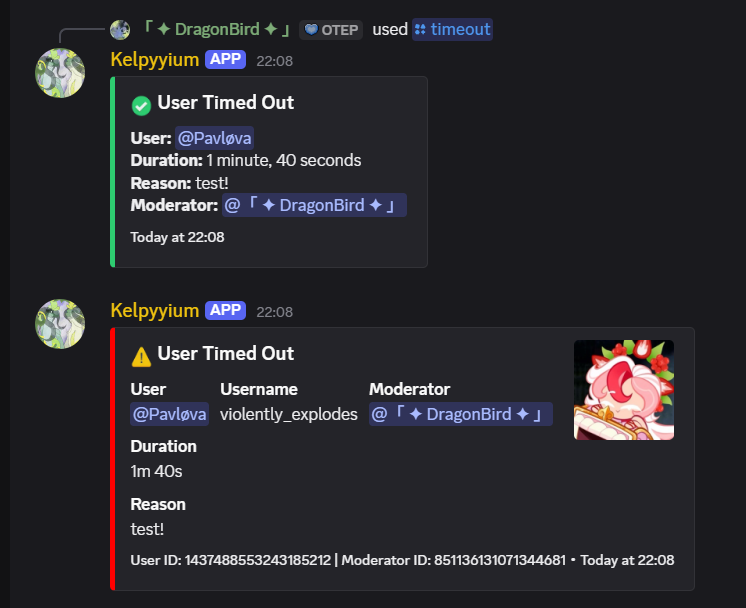
Timeout command example

Example of the /timeout command

/hist View a user's full moderation history mod.history

Syntax

/hist <user>

Parameters

NameTypeRequiredDescription
userUserYesThe user to view history for

Examples

/hist @John — View John's moderation history

Details

  • Shows the last 20 moderation actions for the user (bans, kicks, warns, mutes, etc.).
  • Each entry includes the action type, reason, moderator, and timestamp.
  • Useful for reviewing a user's track record before taking further action.

Screenshot
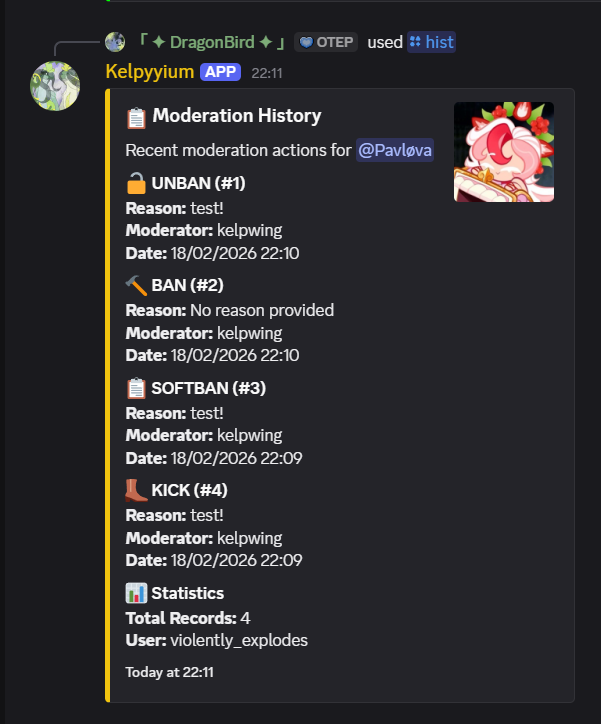
Hist command example

Example of the /hist command output

/purge Bulk delete messages, reactions, replies, or threads mod.purge

Syntax

/purge <type>

Parameters

NameTypeRequiredDescription
typeChoiceYesWhat to purge: messages, reactions, replies, or threads

Examples

/purge messages — Bulk delete recent messages
/purge reactions — Clear all reactions from recent messages

Details

  • Requires Manage Messages and Read Message History bot permissions.
  • Messages older than 14 days cannot be bulk-deleted (Discord limitation).
/lockdown Lock or unlock a channel to prevent regular users from sending messages mod.lockdown

Syntax

/lockdown [channel]

Parameters

NameTypeRequiredDescription
channelChannelNoChannel to lock/unlock. Defaults to the current channel

Examples

/lockdown — Toggle lockdown on the current channel
/lockdown #general — Lock/unlock a specific channel

Details

  • Toggles the channel's permission override for @everyone to deny sending messages.
  • Running the command again unlocks the channel.

Economy

/balance Check your or another user's balance economy.balance

Syntax

/balance [user]

Parameters

NameTypeRequiredDescription
userUserNoUser to check. Defaults to yourself

Examples

/balance — Check your own balance
/balance @John — Check John's balance
/daily Claim your daily reward economy.daily

Syntax

/daily

Details

  • Awards the server's configured daily reward amount.
  • Can only be claimed once every 24 hours.
  • The daily reward amount is configurable via /settings.
/work Work a random job to earn points economy.work

Syntax

/work

Details

  • Generates a random job scenario and reward.
  • Has a cooldown between uses.
/pay Pay coins to another user economy.pay

Syntax

/pay <user> <amount>

Parameters

NameTypeRequiredDescription
userUserYesUser to pay
amountIntegerYesAmount of coins to transfer

Examples

/pay @John 500 — Transfer 500 coins to John
/rob Attempt to rob points from another user economy.rob

Syntax

/rob <user>

Details

  • Has a chance to succeed or fail. If you fail, you lose coins.
  • You can only rob coins from a user's wallet — bank balance is protected.
/baltop Shows the server balance leaderboard economy.baltop

Syntax

/baltop

Details

  • Displays a leaderboard of the richest users in the server.
/bank Manage banking — deposit, withdraw, loans, and admin settings economy.balance

Syntax

/bank <setting> [action] [user] [amount]

Examples

/bank setting:balance — View your bank balance
/bank setting:balance action:add user:@John amount:1000 — Admin: add 1000 to John's bank

Details

  • Bank balance is protected from /rob.
  • Admins can configure max loan amounts, interest rates, and auto-collection.
/gamble Try your luck with various gambling games economy.games.*

Syntax

/gamble <game> <points>

Parameters

NameTypeRequiredDescription
gameChoiceYesGame to play: blackjack, cointoss, poker, rockpaperscissors
pointsIntegerYesAmount of coins to bet
/blackjack Play a game of blackjack economy.games.blackjack

Syntax

/blackjack <bet>

Details

  • Full blackjack with Hit, Stand, and Double Down buttons.
  • Interactive button-based interface.
  • Standard blackjack rules and payouts.
/flip Flip a coin and bet on heads or tails economy.games.flip

Syntax

/flip <bet> <choice>
/dice Roll a dice and bet on the outcome economy.games.dice

Syntax

/dice <bet> <number>
/slots Play the slot machine economy.games.slots

Syntax

/slots <bet>

Details

  • Triple match: big multiplier payout (up to 20x for rare symbols).
  • Double match: smaller payout (1x-2x).
/chargeback Reverse a transaction and log the action (admin) economy.admin.*

Syntax

/chargeback <id> <reason>
/add Add to a user's balance (admin) economy.admin.add

Syntax

/add <user> <amount>
/subtract Subtract from a user's balance (admin) economy.admin.remove

Syntax

/subtract <user> <amount>
/set Set a user's balance (admin) economy.admin.set

Syntax

/set <user> <amount>

Leveling

/rank Display rank information for a user leveling.rank

Syntax

/rank [user]

Details

  • Shows level, XP, XP needed for next level, and server rank position.
/leaderboard Show the XP/level leaderboard leveling.leaderboard

Syntax

/leaderboard

Details

  • Displays the top users by XP in the server. Alias: /lb
/xp Manage user XP (add, subtract, or set) leveling.admin.*

Syntax

/xp <action> <amount> <user>

Examples

/xp add 500 @John — Add 500 XP to John
/xp set 0 @User — Reset a user's XP to 0
/level Manage user levels (add, subtract, or set) leveling.admin.*

Syntax

/level <action> <level> <user>

Examples

/level set 10 @John — Set John's level to 10

Games

/chess Start a chess game against another player or the bot

Syntax

/chess [opponent]

Parameters

NameTypeRequiredDescription
opponentUserNoPlayer to challenge. Leave empty to play against the bot AI

Details

  • Full chess with move validation, check/checkmate detection.
  • Interactive button interface for moves, draw offers, and resignation.
  • Board rendered with text and emoji pieces.
/poker Play five-card draw poker economy.games.*

Syntax

/poker <bet>

Details

  • Five-card draw with hold/discard mechanics via buttons.
  • Standard poker hand rankings and payouts.

Configuration

/settings Configure server settings admin.settings

Syntax

/settings <setting> [value]

Examples

/settings setting:daily-reward value:100 — Set the daily reward to 100 coins

Details

  • Central hub for all server configuration — economy, leveling, moderation, and general settings.
  • Run without a value to see the current setting.
/autoconfig Launch the guided bot configuration wizard admin.settings

Syntax

/autoconfig

Details

  • Walks you through configuring the bot step-by-step with interactive menus.
  • Covers log channels, moderation settings, economy toggles, welcome messages, and more.
  • Recommended for first-time setup.
/permissions Manage user, role, and server permissions admin.permissions

Syntax

/permissions <target> <action> [target-entity] [node] [value]

Examples

/permissions target:user action:set target-entity:@John node:mod.ban value:true
/permissions target:role action:view target-entity:@Moderator

Details

  • Supports user, role, and everyone targets.
  • Actions: set, remove, view.
  • See Permissions for the full list of nodes.
/config Manage bot configuration admin.config

Syntax

/config [action]
/levels Enable or disable the leveling system admin.settings

Syntax

/levels <enable/disable>
/points Enable or disable the economy system admin.settings

Syntax

/points <enable/disable>
/logging Configure server logging channels logging.channel

Syntax

/logging <type> <channel>
/log Create a manual log entry logging.enable

Syntax

/log <type> <message>
/automod Configure auto-moderation filters automod.*

Syntax

/automod <action>

Details

  • Configure spam detection, link filtering, mention spam, caps filter, invite blocking, and word blacklists.
/antispam Configure anti-spam protection automod.spam

Syntax

/antispam <setting> [value]

Examples

/antispam setting:message-limit amount:10
/welcome Configure welcome messages and auto-roles admin.settings

Syntax

/welcome <action> [value]

Examples

/welcome action:message text:Welcome {user} to {server}!

Details

  • Actions: view, message, embed-color, auto-role, enable, test
  • Variables: {user}, {server}, {membercount}, etc.
/reactionrole Manage reaction role systems admin.settings

Syntax

/reactionrole <action>
/rolepersistence Configure role persistence for users who rejoin admin.settings

Syntax

/rolepersistence <action>
/punishment-dm Manage punishment DM notification settings admin.settings

Syntax

/punishment-dm <action>

Details

  • When enabled, users receive a DM when punished with the reason, duration, and an appeal button.
/suspiciousnotify Manage suspicious account notification settings admin.settings

Syntax

/suspiciousnotify <action>
/prefix Configure prefix command settings admin.settings

Syntax

/prefix <action>
/backup Create and restore server configuration backups admin.settings

Syntax

/backup <action> [timestamp]

Details

  • Subcommands: create, list, delete, restore
  • Backups include settings, permissions, logging config, and more.

Proxy System

/proxy Manage proxy members (PluralKit-style) — create, edit, delete, list

Syntax

/proxy <action>

Details

  • Create proxy identities that send messages via webhooks with custom names and avatars.
  • Set prefix/suffix proxy tags (e.g., typing {Hello} sends as a proxy member).
  • See Proxy Features for a full guide.
/proxysettings Manage proxy settings and switch active members

Syntax

/proxysettings <action>

Details

  • Use switch <member> to auto-proxy all messages as a specific member.

Tickets

/ticket Manage support tickets — create, close, add users, panels, categories

Syntax

/ticket <action> [options]

Details

  • Subcommands: create, close, add, remove, panel, settings, categories
  • Ticket panels let users open tickets with a button click.
  • Categories allow organizing different types of support requests.
  • Transcript logging available for closed tickets.

Global Chat

/globalchat Manage cross-server global chat channels globalchat.*

Syntax

/globalchat <subcommand>

Subcommands

SubcommandDescription
createCreate a new global chat channel (name, description, visibility, key)
editEdit an existing global chat channel's properties
deleteDelete a global chat channel you own
linkLink a server channel to a global chat
unlinkUnlink a server channel from its global chat
infoView info about a global chat channel
listList your global chat channels
setrulesSet rules for your global chat channel
manageOpen the management panel (DM only)
kickKick a server from your global chat
banBan a server from your global chat
unbanUnban a server
warnWarn a server
unwarnClear warnings for a server
muteMute a server (with optional duration)
unmuteUnmute a server
addmodAdd a moderator to your channel
removemodRemove a moderator
addcoownerAdd a co-owner to your channel

Examples

/globalchat create name:Lounge description:A chill cross-server chat
/globalchat link channelid:abc123 channel:#global

Details

Utility

/help Get help with bot commands

Syntax

/help [command]

Details

  • Without arguments: shows all commands by category.
  • With a command name: shows detailed help for that specific command.
/ping Check bot latency and response time

Syntax

/ping
/info Show bot information and statistics

Syntax

/info
/serverstats Display comprehensive server statistics

Syntax

/serverstats
/echo Send a message to a channel as the bot utility.echo

Syntax

/echo <message> [channel]

Examples

/echo Hello World #general
/embed Create custom embeds with various styling options utility.echo

Syntax

/embed <type> <title> <description> [color]

Examples

/embed type:simple title:Welcome description:Hello everyone! color:#ff0000
/talkas Send a message as a webhook with custom name and avatar utility.echo

Syntax

/talkas <name> <message> [avatar] [channel]
/rules Manage and display server rules rules.*

Syntax

/rules <action>
/pride Apply pride flag overlays to avatars or images

Syntax

/pride <type> <flag> [url]

Examples

/pride type:avatar flag:rainbow
/flags List and display available pride flags

Syntax

/flags
/pronouns Set pronoun roles for yourself or another user

Syntax

/pronouns <action>
/joke Get a random joke

Syntax

/joke
/dadjoke Get a random dad joke

Syntax

/dadjoke
/error View comprehensive error code documentation

Syntax

/error [category]

Examples

/error category:S — View settings error codes

Details

  • Categories range from A to W, each covering a different area of the bot.
/privacy View the bot's privacy policy and data practices

Syntax

/privacy
/deletedata Delete all your personal data stored by the bot

Syntax

/deletedata

Details

  • Permanently deletes all your personal data with a confirmation step.
  • This action cannot be undone.

Owner Only

/statusmsg Set bot custom status message Owner only

Syntax

/statusmsg [message]
/rpc Set the bot's rich presence (activity) Owner only

Syntax

/rpc <activity>
/appearance Set bot online appearance (online, idle, DnD, invisible) Owner only

Syntax

/appearance <status>
/restart Restart the bot Owner only

Syntax

/restart
/suspiciouslist Manage the global suspicious users masterlist Owner only

Syntax

/suspiciouslist <action>

Details

  • Subcommands: add, remove, check, list, validate
  • Cross-server suspicious user tracking managed by the bot owner.